Stop Overthinking Every Design Decision — A Practical Guide for Confident UX Designers
One big problem in UI/UX Design and Product Development is overthinking things to death by the designer. Designers are sometimes guilty of spending lots of time perfecting minute details of the design, re-refining their layouts over and over, and analysing their colour decisions ad nauseam, when they won’t necessarily help to enhance the user experience for that specific user on that particular occasion.
Designers who excel do not have to do all this over-thinking. Instead, they utilise established decision making processes that provide structure, speed, and confidence in the design development process.
Following are the basic design principles and mental models utilized by successful designers. Here are also a few of the main principles or mental models Related to Designing UI/UX that you may have missed Or aren’t aware of yet.
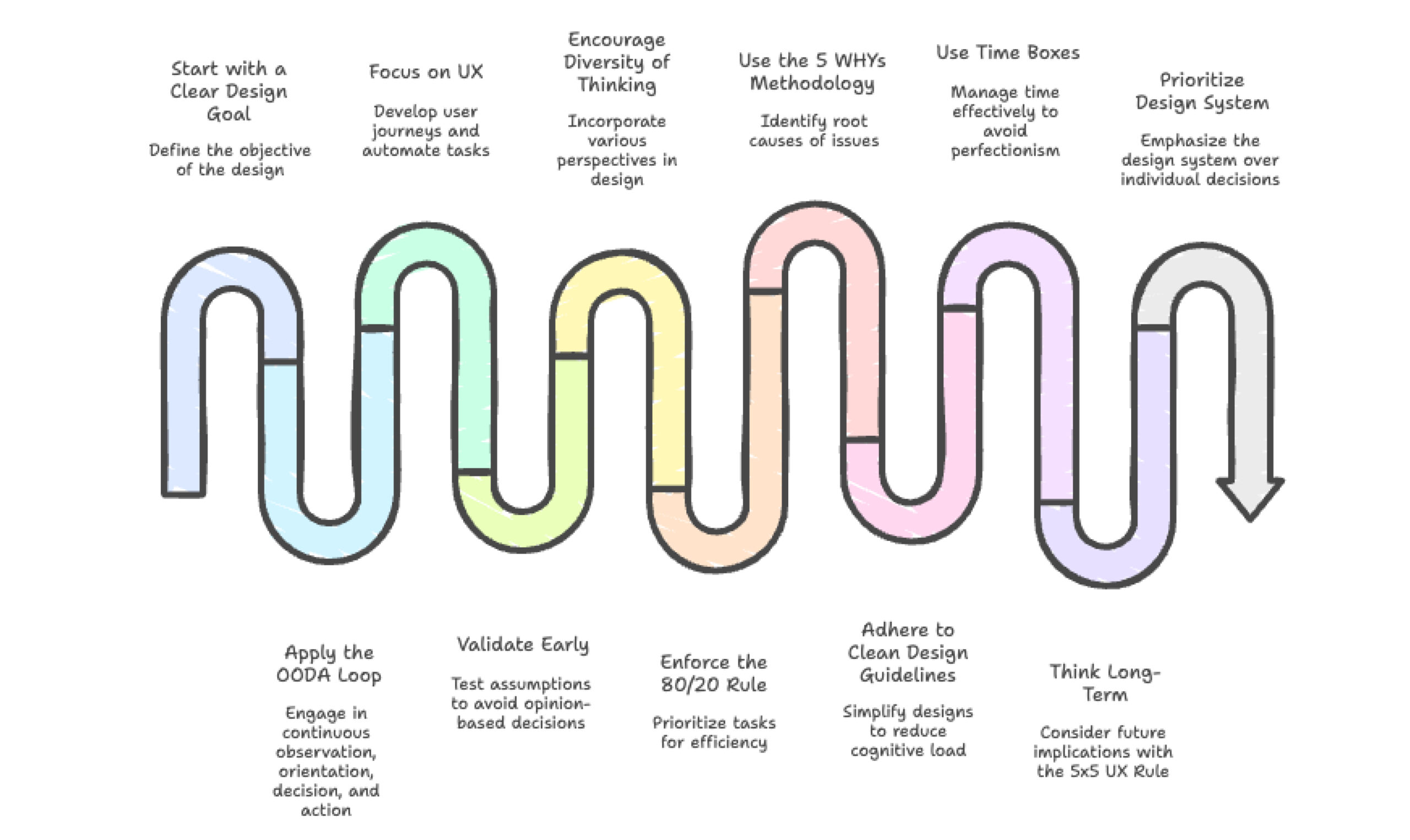
1. Start with a Clear Design Goal
Most people fail to do this Establish one specific goal before using any framework.
Ask yourself:
- What is the problem I am solving now?
- What is the user going to do?
- What are the metrics used to measure success?
Without having a clear goal it will seem that any design option is equally possible, which leads to confusion. The clear goal reduces unnecessary debates about design.
2. The OODA Loop: Design Is an Ongoing Cycle
OODA Loop (Observe → Orient → Decide → Act)
The OODA Loop provides a framework for continuously designing and developing. Designing is a continuous cycle, beginning with
- Observing user behavior and constraints.
- Orienting oneself by obtaining context and insights.
- Deciding from data.
- Acting, shipping and learning.
Importance: Progress is more important than perfection!
3. UX: From User Journeys to Task Automation
Traditional UX is all about optimizing user flows. In an agentic world, UX design must support task-oriented automation—where the AI agent is executing the flow, not the user.
Key Considerations:
- Simplify workflows into modular, callable tasks
- Provide context-rich feedback that agents can parse
- Design for edge cases and fallback options when AI agents encounter errors
4. Validate Early Using Assumptions rather than Opinions (Usually Overlooked).
Overthinking tool is a common issue designers face due to their desire for opinions rather than actual validation.
- Instead of asking for opinions on your idea, you should:
- Write Down Your Assumptions
- Prove Your Assumptions Quickly With Users
Gather Data Not Just Preferences from Users You can save many weeks of uncertainty by conducting just a few short interviews to validate your concept. Testing removes doubt.
5. Diversity of Thinking in UX Design
The best UX design decisions require considering different perspectives, including:
- User Experience Perspective.
- The Business Objective Perspective.
- The Technical Feasibility Perspective.
- The Accessibility/Inclusion Perspective.
- The Emotional Impact Perspective.
- The Scale in 5-10 Years Perspective
Each mode highlights different priorities and eliminates blind spots. The lesson to learn here is that you cannot only think from one perspective when making your decisions.
6. Enforce the 80/20 Rule for Efficiency
Not everything gets equally equal weight.
Focus on core behaviours:
- Core user pathways.
- High-traffic / high impact screens.
- Minimal visual tweaks, generally do not add as much value as repairing/fixing a main pathway.
Key takeaway is: The effort spent on designing must match the outcome in regard to usability by users.
7. The 5 WHYs methodology
Ask ‘Why’ multiple times to get to the root cause of an issue when something is not functioning properly, instead of immediately starting with solutions.
This will allow you to understand
- why users are having difficulty
- why they are quitting the app
- why the feature isn’t working.
In many cases, user experience (UX) challenges are actually caused by other factors. The takeaway from using the Five WHYs methodology is that the cause of an issue may not always be obvious.
8.The Clean Design Guideline: Less is More in Cognition Overload.
When your brain is busy trying to figure out something (overthinking), you will create multiple distractions.
Perform to the Rule:
- What could be taken out?
- Could the design be made easier?
- Everything in my design must have a job.
By following “Clean Design” principles, I will be improving Usability, Accessibility, and Trust in my products.
Conclusion: Simplicity gives designers a significant advantage when designing.
9.By using time boxes, you can prioritize the development process by avoiding perfectionism.
Some examples of how you could use this method include:
- Setting aside 30 Minutes to explore different layouts.
- 15 Minutes to experiment with typography choices.
- 1 day to create early wireframes.
Setting time limits creates boundaries so you will make decisions rather than continuing to refine and push back on everything.
10.Think Long-Term With the 5×5 UX Rule
When you’re fixating on the specifics of a certain element, determine
Will this item make a difference in 5 days or in 5 years?
If it’s unlikely to impact How Usable, Trustworthy and profitable Will be the final product, just Keep Moving Forward
The most important point is that not all decisions need to be given equal consideration.
11.Design System > Individual Decision Making (Usually Missed)
Most people overthink when designing things because they want to build everything from the ground up.
- A good design system reduces your cognitive load creates consistent designs
- Speeds up how long it takes you to make a decision based on your design rules.
- Systems scale much better than individual beliefs. Keep this in mind.
Final Thoughts
Achieving Greater Self-confidence Through Process Rather than Perfection. The tendency toward overthinking is indicative of having an unclear approach to your decision-making system rather than being a design flaw.
When using:
- Clear goals
- A proven framework
- Rapid validation
- Time-bound decision
Your design process will be faster, more effective, and more confident.
Great design is about developing reliable systems for decision-making, not having the “right” answer for everything.